

If you want the short answer, Claim.MD is the best clearinghouse for medical billing for many solo physicians and small practices. Its pricing is public, its plans cover professional and institutional claims, and a practice can start without buying a new EHR. Availity Essentials is a strong free payer portal, Office Ally suits cost-conscious offices, and Waystar offers deeper claim workflows for growing groups. Large physician organizations may be better served by TriZetto, Optum, Experian Health, or SSI.
A clearinghouse can look excellent on a feature sheet and still be wrong for your practice if it misses one high-volume payer, doesn’t connect cleanly with your practice management system, or charges separately for the transactions your team uses every day. The right choice depends less on the largest advertised network and more on your actual payer mix, claim volume, specialty, tax IDs, workflow, and support needs.
This guide compares 15 options without pretending that one vendor fits everyone. Public pricing is shown where the vendor publishes it. “Custom quote” means exactly that.
Best Clearinghouse for Medical Billing at a Glance
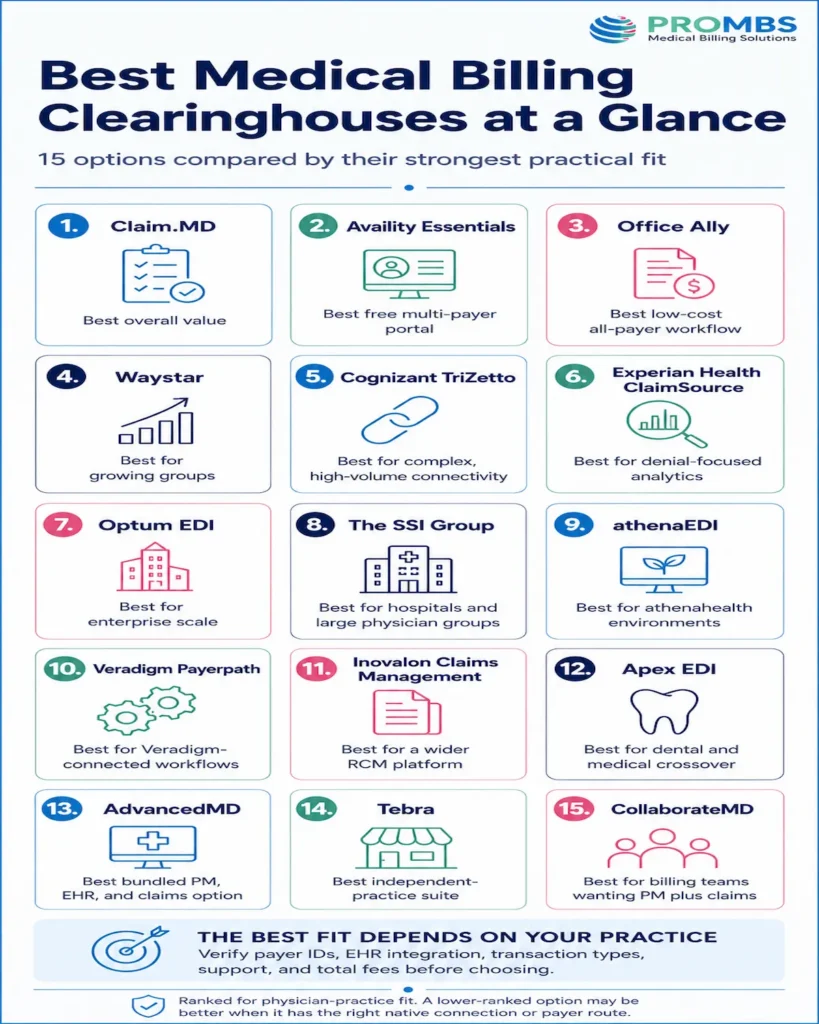
| Clearinghouse or platform | Best fit | Published pricing | Solo physician fit | Group practice fit |
|---|---|---|---|---|
| Claim.MD | Best overall value | $30, $60, or $120/month | Excellent | Good |
| Availity Essentials | Best free multi-payer portal | Free basic access; paid tiers require a quote | Excellent as a portal | Good as a portal or secondary route |
| Office Ally | Best low-cost all-payer workflow | Starts free; transaction fees may apply | Excellent | Fair to good |
| Waystar | Best for growing groups | Custom quote | Fair | Excellent |
| Cognizant TriZetto | Best for complex, high-volume connectivity | Custom quote | Limited | Excellent |
| Experian Health ClaimSource | Best for denial-focused analytics | Custom quote | Limited | Excellent |
| Optum EDI | Best for enterprise scale | Custom quote | Limited | Excellent |
| The SSI Group | Best for hospitals and large physician groups | Custom quote | Limited | Excellent |
| athenaEDI | Best for athenahealth environments | Custom or bundled quote | Fair | Excellent |
| Veradigm Payerpath | Best for Veradigm-connected workflows | Custom quote | Fair | Good |
| Inovalon Claims Management | Best for a wider RCM platform | Custom quote | Fair | Good to excellent |
| Apex EDI | Best for dental and medical crossover | Custom quote | Good | Good |
| AdvancedMD | Best bundled PM, EHR, and claims option | Medical packages generally $429 to $1,070/provider/month | Good | Good |
| Tebra | Best independent-practice suite | Generally $49 to $799/provider/month | Good | Good for smaller groups |
| CollaborateMD | Best for billing teams wanting PM plus claims | Custom quote | Good | Good |
Pricing note: Rates can change. Ask for a written quote listing claims, ERAs, eligibility, attachments, tax IDs, interfaces, enrollment, training, and support.
What a Medical Billing Clearinghouse Actually Does
A medical billing clearinghouse sits between your billing system and insurance payers. It accepts claim data, checks whether the file follows required formats and payer rules, then routes the claim to the correct payer. It can also return acknowledgments, claim status messages, and electronic remittance files.
CMS recognizes standard electronic transactions such as 837 claims, 270/271 eligibility, 276/277 claim status, 278 prior authorization, and 835 remittance under its HIPAA administrative transaction standards. A capable EDI clearinghouse helps your software exchange these transactions without building a separate connection to every payer.
One distinction saves a lot of confusion:
- A clearinghouse rejection usually happens before payer adjudication. The file may have missing data, an invalid identifier, or a formatting problem.
- A payer denial happens after the payer evaluates the claim. The cause may involve coverage, medical necessity, authorization, coding, bundling, or timely filing.
Strong claim scrubbing can prevent many avoidable rejections and flag some denial risks. It cannot guarantee payment. If a vendor treats “accepted by our clearinghouse” as the same thing as “paid by the payer,” ask harder questions.
You can explore the process in more detail in PROMBS’ guide to how a clearinghouse works in medical billing.
How We Compared the 15 Options
This list is ranked for physician practices. We compared five practical areas:
- Payer and transaction fit: Does the platform support the practice’s payers and the exact transactions it needs?
- Integration: Can it connect with the existing EHR, practice management system, billing software, or API?
- Claim editing: Are errors clear, actionable, and specific enough for staff to correct quickly?
- Workflow and reliability: Does it support work queues, users, locations, tax IDs, attachments, reporting, and continuity?
- Total cost and support: What will the practice pay after add-ons and staff rework, and who helps when a file fails?
The order reflects broad fit. A vendor ranked lower can still be the right choice when it has a native connection to your software or a better route to a critical payer.
A Clearinghouse Can Transmit a Claim. It Can’t Manage the Whole Revenue Cycle.
If rejections, denials, aging A/R, and missed follow-up are still slowing payment, PROMBS can review the workflows behind them and identify where revenue is getting stuck.
The 15 Best Clearinghouse for Medical Billing
1. Claim.MD: Best Overall Value for Solo and Small Practices
Claim.MD earns the top position because it combines transparent pricing with the core transactions most independent practices need. The Basic plan is $30 per month and charges by use. Small Volume costs $60 per month and includes 100 claims, 100 ERA claim responses, and 100 eligibility transactions. Unlimited costs $120 per month and includes unlimited claims and ERAs plus 1,000 eligibility transactions. There are no setup or per-provider fees, although the Unlimited plan includes one billing tax ID and prices additional IDs separately.
It supports 837P and 837I files, electronic appeals, attachments, real-time validation, and several input formats. That makes it a practical choice when an office wants a standalone claims clearinghouse without replacing its clinical software.
Key features
- Real-time validation for 837P and 837I claims.
- ERA, eligibility, electronic appeal, and attachment workflows.
- Batch, single-claim, spreadsheet, and alternate file-format support.
Pros
- Public pricing makes budgeting and comparison easier.
- Strong fit for solo providers, small groups, and billing services with modest complexity.
Cons
- Extra tax IDs, attachments, paper work, and overages can change the final cost.
- Large groups may need deeper work queues, analytics, and service guarantees.
2. Availity Essentials: Best Free Multi-Payer Portal
Availity Essentials is a health-plan-sponsored, multi-payer portal. Its free access can include eligibility and benefits, authorization and referral activity, claims and claim status, remittances, payer notifications, and payer-specific spaces. Paid Essentials Plus and Essentials Pro options expand access and revenue cycle tools, but pricing requires a quote.
The catch is scope. Free access doesn’t mean every payer, transaction, and workflow is available at no cost. Verify each payer on Availity’s current payer list and confirm what your plan sponsors support. For many practices, Availity works best beside the primary clearinghouse as a payer portal, enrollment tool, or secondary route.
Key features
- Multi-payer eligibility and benefits verification.
- Claims, claim status, remittance, authorization, and referral tools.
- Payer-specific spaces, notices, and business intelligence access.
Pros
- Free entry point for many common payer transactions.
- Familiar workflows across participating health plans.
Cons
- Coverage and functionality vary by payer.
- Advanced automation and broader connectivity may require a paid tier.
3. Office Ally: Best Low-Cost All-Payer Workflow
Office Ally’s Service Center starts free, though transaction fees may apply. Current published add-ons include eligibility at $10 for the first 100 transactions and $0.10 each after that, plus $0.55 per claim attachment. Its high-volume EDI clearinghouse uses custom pricing.
The platform supports claim creation, submission, acknowledgments, status, attachments, ERAs, and SFTP. It also accepts several file methods, which helps practices using older or less common billing software. In practice, Office Ally is attractive when cost matters and the team can work comfortably with a simpler portal. Groups should test reporting, user controls, and exception handling before committing.
Key features
- Online claim entry, file upload, SFTP, and enterprise integration options.
- Claim acknowledgments, status tracking, ERAs, and attachments.
- Real-time eligibility and broad practice-management compatibility.
Pros
- Low entry cost and broad compatibility.
- Standalone portal, file transfer, and integrated EDI options.
Cons
- “Starts free” isn’t the same as zero total cost.
- Reporting and workflow depth may feel light for complex groups.
4. Waystar: Best for Growing Physician Groups
Waystar moves beyond basic routing into structured claim management. Its packages can include automated claim edits, workgroups, payer response simplification, proof-of-timely-filing reports, status automation, denial workflows, appeals, dashboards, and remittance reconciliation. Pricing is custom.
That depth becomes useful when five people touch the same revenue cycle and managers need to see who owns each exception. A solo practice with straightforward professional claims may pay for more capability than it uses. A multi-location specialty group can gain more from automation, assignment rules, and visibility.
Key features
- Automated front-end edits and payer-response simplification.
- Configurable workgroups, status monitoring, and proof-of-timely-filing reports.
- Denial, appeal, remittance, reconciliation, and analytics tools.
Pros
- Rich claim, denial, appeal, and reporting workflows.
- Better fit for teams that need assignments and exception-based work.
Cons
- No public rate card for a simple apples-to-apples comparison.
- Implementation and configuration require more planning than a basic portal.
5. Cognizant TriZetto: Best for Complex, High-Volume Connectivity
TriZetto Provider Solutions is built for scale. Cognizant TriZetto reports thousands of payer connections and hundreds of EHR integrations, with claim management, remittance workflows, automated status inquiries, EOB conversion, patient access tools, and analytics. Pricing is quote-based.
The platform is especially relevant to billing companies, large multi-specialty groups, and organizations processing high transaction volume across multiple systems. A one-provider office may find the contracting, setup, and product breadth heavier than necessary. Groups should ask which modules are required and whether the quote includes enrollment, analytics, support tiers, and attachments.
Key features
- Claims, remittance, eligibility, and automated claim-status workflows.
- Extensive payer connectivity and EHR integration options.
- EOB conversion, patient-access tools, and revenue cycle analytics.
Pros
- Extensive payer and system connectivity.
- Strong transaction and analytics breadth.
Cons
- Pricing and packaging aren’t public.
- Maybe more platform than a small practice needs.
6. Experian Health ClaimSource: Best for Denial-Focused Analytics
Experian Health combines clearinghouse functions with claims editing, submission, status, denial workflow, and predictive tools. ClaimSource is the core claims management product, while other modules add automation and risk prioritization. Pricing requires a custom quote.
This option makes the most sense when a group wants more than file transport. For example, a high-volume specialty practice may need to identify patterns across payer edits, claim status, and denial risk before staff spend hours on manual follow-up. The tradeoff is a larger solution footprint and likely module decisions during procurement.
Key features
- ClaimSource editing, validation, submission, and tracking.
- Predictive claim-risk and denial-prioritization tools.
- Automated claim status, denial workflow, and reporting modules.
Pros
- Strong claims management and analytics focus.
- Useful for groups trying to reduce manual claim follow-up.
Cons
- Quote-only pricing makes early budgeting harder.
- Smaller offices may not use enough advanced functionality to justify the setup.
7. Optum EDI: Best for Enterprise Scale
Optum’s EDI network supports high-volume exchange between providers and payers and sits within a much larger healthcare technology portfolio. It’s suited to organizations that need broad connectivity, large transaction capacity, and adjacent payment or revenue cycle services. Pricing is custom.
Optum can be a logical enterprise choice, but brand size shouldn’t replace due diligence. Ask which network, portal, and support team will serve your organization. Review uptime commitments, escalation paths, data export, and continuity procedures in writing. Small practices should first decide whether a simpler standalone service can meet the same daily need with less complexity.
Key features
- Professional, institutional, dental, remittance, eligibility, status, authorization, and attachment transactions.
- SFTP, API, real-time, and portal-based connectivity.
- Intelligent routing, validation, alerts, dashboards, and attachment tracking.
Pros
- Enterprise reach and broad healthcare transaction capabilities.
- Suitable for high volume and complex integration requirements.
Cons
- Contracting and implementation can be heavy for smaller practices.
- Public pricing isn’t available for a direct comparison.
8. The SSI Group: Best for Hospitals and Large Physician Groups
SSI’s clearinghouse supports professional and institutional claims, eligibility, claim status, ERAs, attachments, and authorization transactions. Its platform emphasizes payer-specific edits, exception-based workflows, direct payer connections, EHR integration, and high-touch support. Pricing is custom.
SSI stands out when the organization needs a service relationship along with technology. It can fit large physician groups, ASCs, and health systems where institutional and professional billing overlap. A solo physician is unlikely to need this level of operational depth.
Key features
- 837P, 837I, 835, 270/271, 276/277, 275, and 278 support.
- Payer-specific edits and exception-based claim work queues.
- Direct payer connectivity, EHR integration, analytics, and high-touch support.
Pros
- Strong fit for complex claims and multi-setting organizations.
- Advanced edits, exception handling, and service support.
Cons
- No public pricing.
- Likely excessive for a simple, low-volume professional claim workflow.
9. athenaEDI: Best for Athenahealth Environments
athenaEDI is an all-payer clearinghouse designed to integrate with athenahealth revenue cycle products, including athenaIDX and athenaPractice. It combines eligibility, claims, remittance data, workflow integration, performance monitoring, and payer inquiry support. Pricing requires a quote or comes through a broader platform arrangement.
Native integration is the reason to shortlist it. If a group already runs athenahealth products, keeping EDI inside the same workflow can reduce file handling and duplicate data entry. If the practice uses another EHR, the value case is less obvious.
Key features
- Integrated eligibility, claim, remittance, and payment workflows.
- Revenue cycle monitoring and automated payer inquiries.
- Native connections with compatible athenahealth practice platforms.
Pros
- Deep integration with athenahealth workflows.
- Combines transaction processing with performance monitoring.
Cons
- Best value is tied to the athenahealth ecosystem.
- Pricing isn’t publicly itemized for easy comparison.
10. Veradigm Payerpath: Best for Veradigm-Connected Workflows
Payerpath covers claims, eligibility, acknowledgments, status, ERAs, and electronic attachments. Its terms indicate that pricing can include provider-count fees, transaction or volume charges, minimum monthly spend, and implementation fees, depending on the order.
That detail is useful because it shows why buyers need a complete quote. A low base amount tells little if provider counts, go-live services, or transaction minimums sit elsewhere in the agreement. Payerpath is most compelling for practices already using Veradigm software or those that confirm a clean integration with their current system.
Key features
- Claims, eligibility, acknowledgment, status, ERA, and attachment transactions.
- Payer-tuned edits, exception management, and direct EDI connectivity.
- Analytics, remittance, patient payment, and performance tools.
Pros
- Broad core EDI transaction support.
- Payer-specific edits and integrated attachment workflows.
Cons
- Multiple possible fee types require careful contract review.
- Value depends heavily on the exact integration and package.
11. Inovalon Claims Management: Best for a Broader Provider Cloud
Inovalon’s claims management tools sit within a wider provider revenue cycle platform. The appeal is a connected workflow covering claim submission, editing, status, payments, and analytics rather than a portal used only to upload files. Pricing is quote-based.
Groups considering Inovalon should map the proposed modules against what their EHR already does. Buying duplicate eligibility, payment, or analytics tools can raise cost without improving results. On the other hand, a connected suite can reduce handoffs when the current revenue cycle is fragmented.
Key features
- Claim scrubbing, submission, tracking, and exception workflows.
- Remittance and payment-management capabilities.
- Connected provider-cloud analytics and revenue cycle modules.
Pros
- Broader platform approach beyond claim transmission.
- Can support a connected RCM workflow and reporting.
Cons
- No public clearinghouse-only price.
- Buyers need to separate essential modules from overlapping add-ons.
12. Apex EDI: Best for Dental and Medical Crossover
Apex EDI supports standard professional and dental claim formats, file uploads, web services, a web portal, payer responses, eligibility, and ERA workflows. It can accept ANSI files and other formats, which gives software vendors and practices several integration paths. Pricing requires a quote.
The platform deserves a place on the shortlist for oral surgery, dental organizations, and practices that cross between dental and medical billing. Those workflows can be awkward on a clearinghouse designed mainly around 837P claims. Confirm the exact dental and medical payer routes, attachment support, and how staff will correct failed claims.
Key features
- ANSI 5010P and 5010D plus print-image and PDF claim formats.
- Web services, OneTouch transfer, and manual upload options.
- Eligibility, ERA, claim-status, payer-response, and resubmission tools.
Pros
- Supports dental and professional medical claim use cases.
- Multiple upload and integration methods.
Cons
- Public pricing isn’t available.
- Broader medical groups may prefer deeper analytics and work queues elsewhere.
13. AdvancedMD Medical Billing: Best Bundled PM, EHR, and Claims Option
AdvancedMD Medical Billing is not a clearinghouse-only purchase. It bundles claims management with practice management, EHR, patient engagement, and optional RCM services. Published medical specialty packages generally range from $429 to $1,070 per provider per month. Practice management encounter pricing is listed at $0.87 to $1.74 per claim, while PM plus EHR encounter pricing runs higher.
That can be good value if the practice wants to replace several systems. It’s poor value if the only need is claim routing. Compare it against other all-in-one platforms, not against a $30 standalone clearinghouse plan.
Key features
- Integrated EHR, practice management, claims, and patient billing.
- Eligibility, ERA, claim-management, and payment workflows.
- Subscription, encounter-based pricing, reports, and analytics.
Pros
- Unified clinical and financial workflow.
- Subscription and encounter-based options.
Cons
- Much broader and more expensive than a clearinghouse-only tool.
- Migration and workflow change can outweigh any EDI benefit.
14. Tebra: Best Independent-Practice Suite
Tebra combines EHR, billing, telehealth, and patient engagement for independent practices. Its published guidance places monthly pricing between roughly $49 and $799 per provider, depending on the solution, provider type, claim volume, and bundle. It also offers lower-volume pricing for practices submitting 100 or fewer claims monthly.
Like AdvancedMD Medical Billing, Tebra belongs in this comparison only when the buyer wants an integrated practice platform. A solo behavioral health or primary care office may prefer one subscription and one workflow. A larger multi-site group may need more sophisticated enterprise controls.
Key features
- Real-time eligibility, claims management, and denial workflows.
- Connected EHR, practice management, payments, and reporting.
- Telehealth, scheduling, intake, and patient-engagement tools.
Pros
- Designed around independent and smaller medical practices.
- Low-volume pricing can help a new or lightly billing practice.
Cons
- The broad price range makes a personalized quote necessary.
- Not the right comparison if you need only standalone EDI.
15. CollaborateMD: Best for Billing Teams Wanting PM Plus Claims
CollaborateMD combines practice management and medical billing software with real-time electronic claims. Depending on the plan, features can include unlimited eClaims, ERAs with auto-posting, real-time eligibility, deeper claim edits, attachments, dashboards, and multi-client billing workflows. Current pricing is provided by quote.
This is a practical option for a billing office or practice that wants claim submission inside its operational software. It is less useful when the practice already likes its PM system and only needs a neutral clearinghouse connection.
Key features
- Real-time electronic claims with built-in clearinghouse edits.
- ERA auto-posting, eligibility, claim follow-up, and dashboards.
- Multi-client billing, scheduling, payments, and reporting workflows.
Pros
- Claims, reporting, scheduling, payments, and billing workflows in one platform.
- Packages for practices and medical billing organizations.
Cons
- Current dollar pricing isn’t displayed publicly.
- Some valuable functions are plan-dependent.
Pricing Comparison (2026)
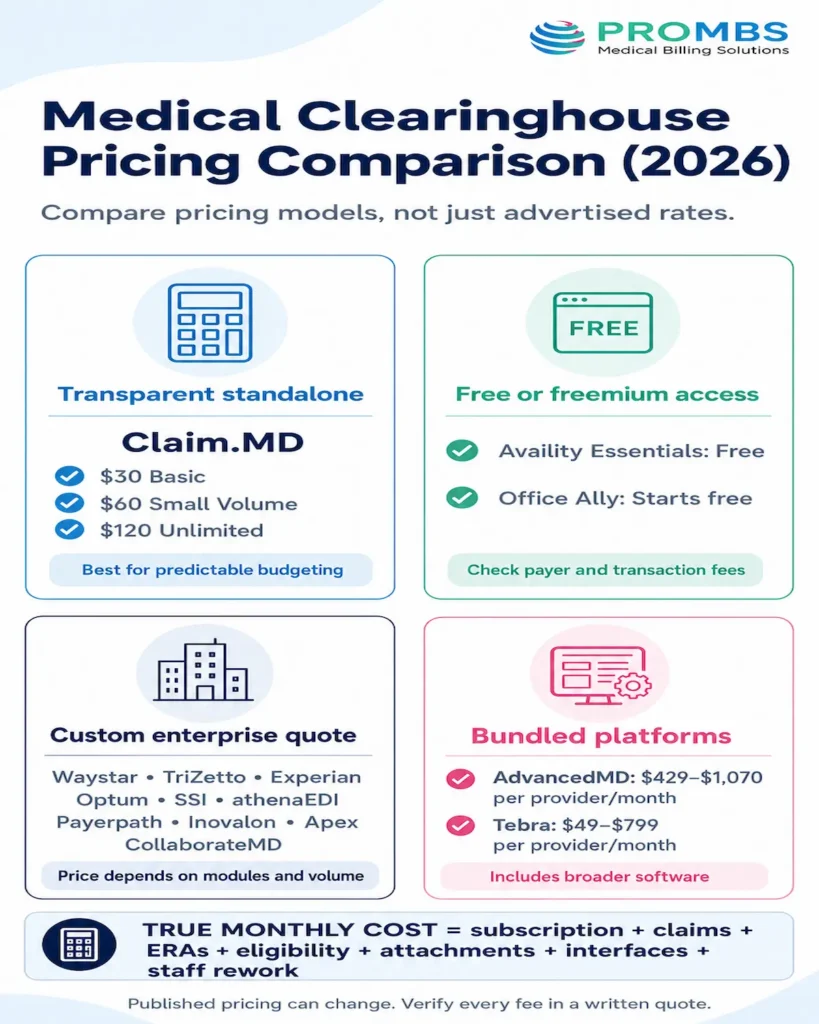
Medical clearinghouse pricing falls into three broad models: low-cost standalone subscriptions, custom enterprise quotes, and bundled EHR or practice-management packages. The table keeps those models separate so a $30 clearinghouse isn’t compared as though it includes the same software as a $500-per-provider platform.
| Option | Published price or pricing model | What to confirm before signing |
|---|---|---|
| Claim.MD | Basic $30/month; Small Volume $60/month; Unlimited $120/month | Included claims, ERAs and eligibility; overages; additional tax IDs; attachments |
| Availity Essentials | Essentials is free; Plus and Pro require a quote | Participating payers, premium transactions, analytics and authorization access |
| Office Ally | Service Center starts free; transaction fees may apply; enterprise EDI is custom | Eligibility volume, attachments, payer-specific fees, SFTP and integration costs |
| Waystar | Custom quote by package and modules | Claim manager, eligibility, monitoring, denial, appeal, remit and analytics modules |
| Cognizant TriZetto | Custom enterprise or volume-based quote | Enrollment, implementation, transaction volume, EHR interfaces and support tier |
| Experian Health ClaimSource | Custom quote | ClaimSource licensing, AI modules, status tools, implementation and analytics |
| Optum EDI | Custom quote | Transaction types, API or SFTP access, attachments, implementation and service terms |
| The SSI Group | Custom quote | Claims, eligibility, remittance, denial, analytics, EHR integration and support scope |
| athenaEDI | Custom or bundled athenahealth quote | Required athenahealth products, implementation, payer services and module inclusions |
| Veradigm Payerpath | Custom quote using provider, transaction or volume elements | Provider count, minimum spend, implementation, attachments and payment modules |
| Inovalon Claims Management | Custom quote | Required Provider Cloud modules, interfaces, analytics and implementation |
| Apex EDI | Custom quote | Medical and dental payer routes, transaction fees, attachments and enrollment |
| AdvancedMD | Medical packages generally $429 to $1,070/provider/month; PM encounter pricing $0.87 to $1.74/claim | Practice management, EHR, billing and claim features are bundled; implementation and add-ons |
| Tebra | Generally $49 to $799/provider/month depending on product, provider type, volume and bundle | Claims allowance, low-volume eligibility, EHR, billing, payments and engagement tools |
| CollaborateMD | Custom quote by plan and organization type | Provider fees, tax IDs, ERA, eligibility, advanced edits, attachments and interfaces |
Prices can change, and enterprise contracts are often negotiable. Ask every finalist to price the same sample per month rather than comparing a vendor’s lowest advertised rate with another vendor’s full package.
Use this total-cost formula:
Monthly clearinghouse cost = subscription + claims + ERAs + eligibility + attachments + extra tax IDs + interfaces + enrollment + support upgrades + staff rework
A solo physician submitting 150 claims may care most about the subscription and overage rules. A ten-provider group may save more with better work queues, batch corrections and automated status checks, even when the quoted fee is higher.
Best Clearinghouse per Practice Size (2026)
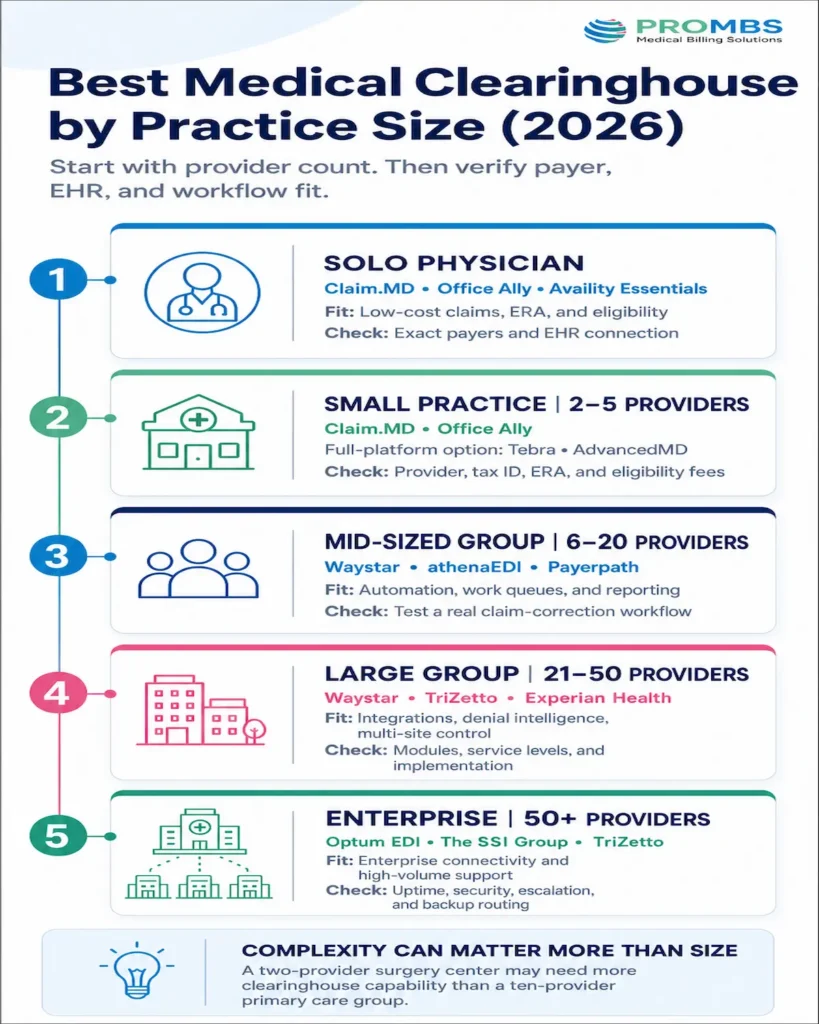
Provider count is a useful starting point, but it shouldn’t decide the purchase alone. A two-provider ASC can have a more complex claim mix than a ten-provider primary care group.
| Practice size | Best starting shortlist | Why these options fit | Main buying check |
|---|---|---|---|
| Solo physician | Claim.MD, Office Ally, Availity Essentials | Low entry cost, simple professional claims and core eligibility, ERA and status tools | Confirm the exact payers and EHR connection |
| Small practice, 2 to 5 providers | Claim.MD, Office Ally; Tebra or AdvancedMD if replacing the full platform | Predictable standalone options plus integrated suites for practices that need Practice Management or EHR software | Compare tax-ID, provider, eligibility and ERA fees |
| Mid-sized group, 6 to 20 providers | Waystar, athenaEDI, Veradigm Payerpath | Better automation, work queues, attachments, reporting and multi-user control | Test real claim correction and assignment workflows |
| Large group, 21 to 50 providers | Waystar, Cognizant TriZetto, Experian Health | Stronger integrations, denial intelligence, multi-location visibility and high-volume processing | Negotiate modules, service levels and implementation |
| Enterprise group or health system, 50+ providers | Optum EDI, The SSI Group, Cognizant TriZetto | Enterprise connectivity, institutional and professional transactions, APIs and operational support | Review uptime, security, escalation and backup routing |
For a solo physician, changing a reliable native clearinghouse to save a small monthly amount can create more work than value. For groups, the cheapest transaction rate can become expensive when staff must manually sort errors, check status and move files between systems.
Group practices should require role-based access, audit trails, work queues by payer and location, batch resubmission, attachment workflows, automated status checks, multi-location reporting, usable data exports and a tested continuity plan.
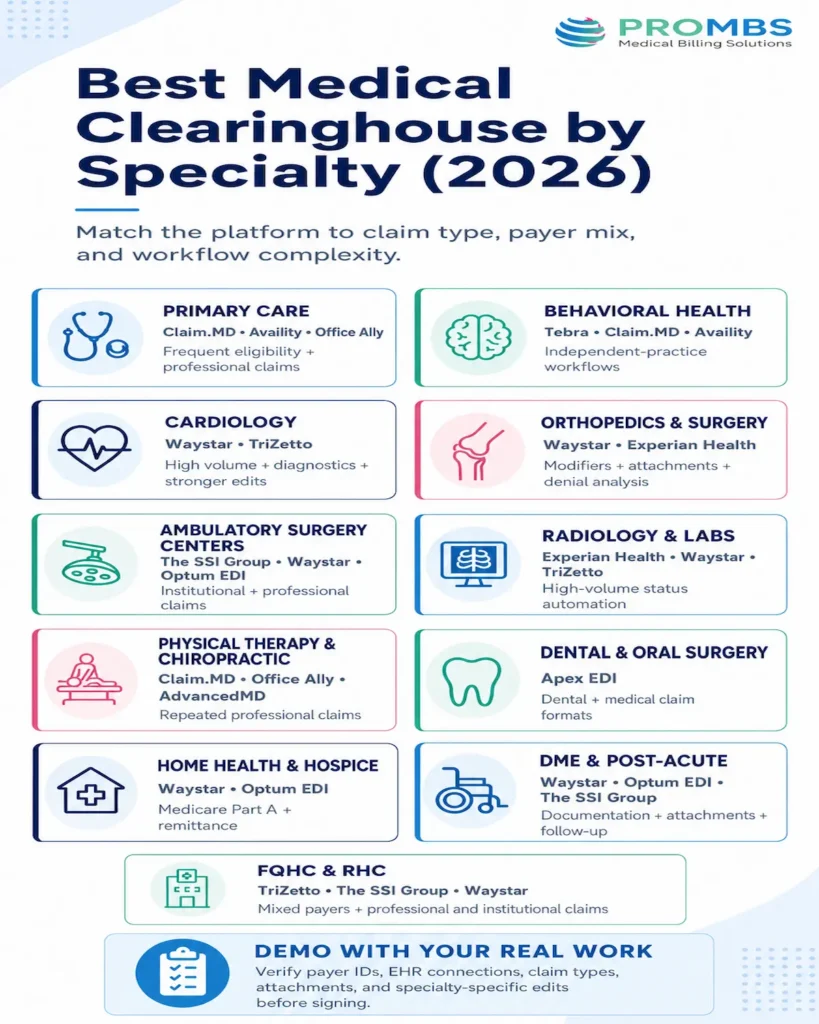
Best Clearinghouse by Medical Specialty (2026)
Specialty matters because claim type, payer mix, attachment volume, authorization activity and billing software differ. These recommendations are starting shortlists, not substitutes for checking payer IDs and live integrations.
| Medical specialty or setting | Best starting shortlist | Why |
|---|---|---|
| Family medicine and primary care | Claim.MD, Availity Essentials, Office Ally | Broad commercial and government payer activity, frequent eligibility checks and mostly professional claims |
| Behavioral and mental health | Tebra, Claim.MD, Availity Essentials | Tebra suits an integrated independent-practice workflow; Claim.MD works when the practice keeps its current EHR |
| Cardiology | Waystar, Cognizant TriZetto | High claim volume, diagnostics, multiple sites and the need for stronger edits and status automation |
| Orthopedics and general surgery | Waystar, Experian Health | Procedure-heavy claims, modifiers, attachments, authorization risk and denial analysis |
| Ambulatory surgery centers | The SSI Group, Waystar, Optum EDI | Institutional and professional claims, revenue codes, attachments and complex payer routing |
| Radiology and clinical laboratories | Experian Health, Waystar, Cognizant TriZetto | High transaction volume, automated status work and centralized exception management |
| Physical therapy and chiropractic | Claim.MD, Office Ally, AdvancedMD | Repeated professional claims and affordable standalone options; AdvancedMD fits practices also replacing PM or EHR tools |
| Dental and oral surgery | Apex EDI | Support for dental and professional medical claim formats, plus several submission methods |
| Home health and hospice | Waystar, Optum EDI | Medicare Part A workflows, claim monitoring, attachments, status and remittance automation |
| DME and post-acute providers | Waystar, Optum EDI, The SSI Group | Documentation-heavy claims, payer-specific rules, attachments and high follow-up needs |
| FQHCs and rural health clinics | Cognizant TriZetto, The SSI Group, Waystar | Mixed payer programs, professional and institutional transactions, reporting and integration complexity |
A specialty label alone isn’t enough. During the demo, give the vendor real examples of your highest-volume procedures, payers, claim types and attachments. Ask it to show which edits are specialty-specific, which come from payer rules and which can be configured by your team.
Seven Mistakes to Avoid When Choosing a Clearinghouse
1. Comparing payer counts instead of your payers
A network of thousands sounds reassuring. It doesn’t help if your state Medicaid plan or dominant commercial payer requires a separate route. Match payer IDs and transaction types, not just brand names.
2. Treating “accepted” as “paid”
Ask where the vendor measures its clean-claim or acceptance rate. Clearinghouse acceptance, payer acceptance, first-pass adjudication, and payment are different milestones.
3. Ignoring add-on transactions
A low claims fee can be offset by eligibility, ERA, attachment, paper claim, extra tax ID, or interface charges. Get every recurring and one-time fee in writing.
4. Skipping a real workflow test
Don’t settle for a polished dashboard demo. Submit test claims from your own practice management system, trigger a known error, correct it, retrieve an ERA, and trace the acknowledgment chain.
5. Assuming better scrubbing fixes weak billing
A rules engine can catch a missing NPI. It can’t repair absent documentation, obtain a forgotten authorization, or appeal a medical-necessity denial by itself. PROMBS’ guide to preventing claim denials explains the wider workflow.
6. Forgetting business continuity
Document how claims will be held, exported, or rerouted during an outage. Know who owns payer enrollment for the backup route and test the plan before it’s needed.
7. Signing before reviewing exit terms
Confirm contract length, renewal, price increases, data ownership, export formats, termination support, and the time allowed to retrieve reports after cancellation.
Final Thoughts
The best clearinghouse for medical billing is the one that fits your existing system, actual payer list, claim volume, and staff workflow.
Solo physicians can start with Claim.MD, Office Ally, and Availity. Growing groups should compare Waystar with the clearinghouse already integrated into their EHR. Larger organizations can evaluate TriZetto, Experian Health, Optum, and SSI through a formal quote and workflow test.
Buy fewer manual touches, clear error messages, dependable connections, and support your team can reach when money is stuck.
Not Sure Whether the Problem Is Your Clearinghouse or the Workflow Around It?
PROMBS can review rejected claims, denial patterns, aging A/R, payer follow-up, and the handoffs between your staff and technology. You’ll see where the real delays begin before replacing a system that may not be the cause.
Frequently Asked Questions
What is the best clearinghouse for a solo medical practice?
Claim.MD is a strong overall choice for many solo practices because it publishes $30, $60, and $120 monthly plans and supports common claims, ERA, eligibility, and attachment workflows. Office Ally can offer a lower entry cost, while Availity Essentials is useful when the practice’s payers participate. Always confirm EHR integration and actual payer IDs before choosing.
Do I need a separate clearinghouse if my EHR already includes one?
Not necessarily. A native connection usually reduces duplicate work. Evaluate its payer coverage, rejection reporting, transaction fees, support, and data access first. Switch or add a secondary service only when there is a clear workflow, cost, payer, or reliability gap.
Can a clearinghouse eliminate claim denials?
No. It can identify formatting, demographic, identifier, and some payer-rule problems before submission. It cannot correct weak documentation, missing authorization, coverage exclusions, medical-necessity issues, or every coding error. A strong clean-claim workflow still depends on front-desk, coding, billing, and follow-up discipline.
What is the difference between a clearinghouse and a medical billing company?
A clearinghouse is mainly the technology and network used to validate and exchange transactions. A medical billing company manages human and operational work such as charge entry, coding review, claim correction, denial follow-up, payment posting, A/R, and reporting. Many billing companies use one or more clearinghouses on behalf of clients.