

The best internal medicine billing software depends on your clinical workflow, payer mix, staffing, and support model. athenaOne is the strongest all-around choice for many growing practices. AdvancedMD offers deeper billing control, Tebra fits independent practices, CollaborateMD is billing-first, and OmniMD stands out for specialty workflows.
There isn’t a universal winner. A solo internist with one biller shouldn’t buy the same system as a 40-provider group. This guide compares 12 credible platforms and shows you how to test them before signing.
Editorial transparency: Selections are based on current public product information and practical workflow fit. Pricing and packaging change, so confirm every quote and contract term directly.
Quick Picks
- Best overall: athenaOne
- Best billing control: AdvancedMD
- Best for independent practices: Tebra
- Best billing-first option: CollaborateMD
- Best specialty fit: OmniMD
How We Evaluated the Platforms
We prioritized charge capture, payer edits, eligibility, remittance posting, denial queues, A/R reporting, implementation, data portability, and role clarity. We also considered whether each product works best as medical billing software, a broader practice management software, or a service-supported revenue cycle management software solution.
AI earns credit only when it reduces a measurable task, preserves an audit trail, and keeps a human accountable.
At-a-Glance Comparison
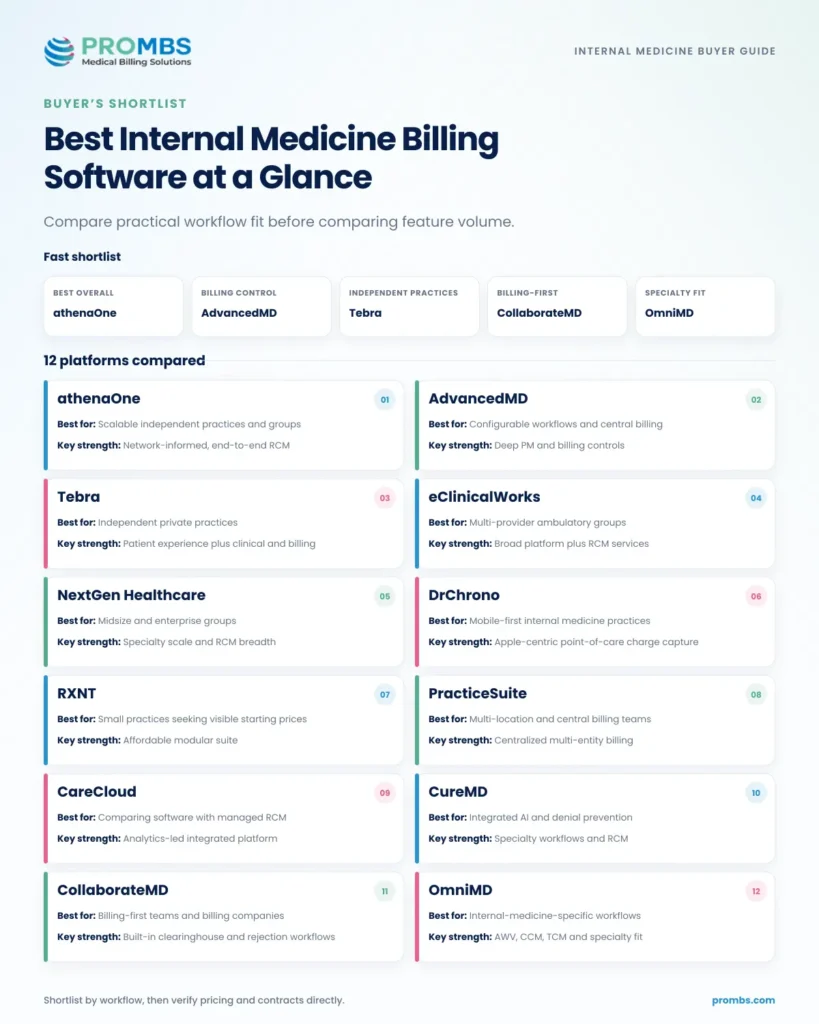
| Platform | Best for | Key strength | Pricing approach |
| athenaOne | Scalable independent practices and groups | Network-informed, end-to-end RCM | Custom, commonly collection based |
| AdvancedMD | Configurable workflows and central billing | Deep PM and billing controls | Custom quote |
| Tebra | Independent private practices | Patient experience plus clinical and billing | Package or custom quote |
| eClinicalWorks | Multi-provider practices | Broad ambulatory platform plus RCM services | Public software tiers; RCM quote |
| NextGen Healthcare | Midsize and enterprise groups | Specialty scale and revenue-cycle breadth | Custom quote |
| DrChrono | Mobile-first practices | Apple-centric point-of-care charge capture | Custom plan quote |
| RXNT | Small practices seeking visible starting prices | Affordable modular suite | Starts at $118 per month on vendor page |
| PracticeSuite | Multi-location groups and billing teams | Centralized multi-entity billing | Tiered and custom options |
| CareCloud | Practices comparing software and managed RCM | Analytics-led integrated platform | Custom by product and service scope |
| CureMD | Practices wanting integrated AI and RCM | Specialty workflows and denial prevention | Custom quote |
| CollaborateMD | Billing-first teams and billing companies | Built-in clearinghouse and rejection workflows | Public tiered plans |
| OmniMD | Internal medicine-specific workflows | AWV, CCM, TCM, and specialty fit | Custom quote |
Pricing note: advertised starting prices rarely include every provider, interface, clearinghouse transaction, implementation service, or managed-RCM function.
What Internal Medicine Billing Software Must Handle
Internal medicine billing is demanding because routine days mix chronic care, medication changes, preventive services, lab review, and separately documented problem-oriented work.
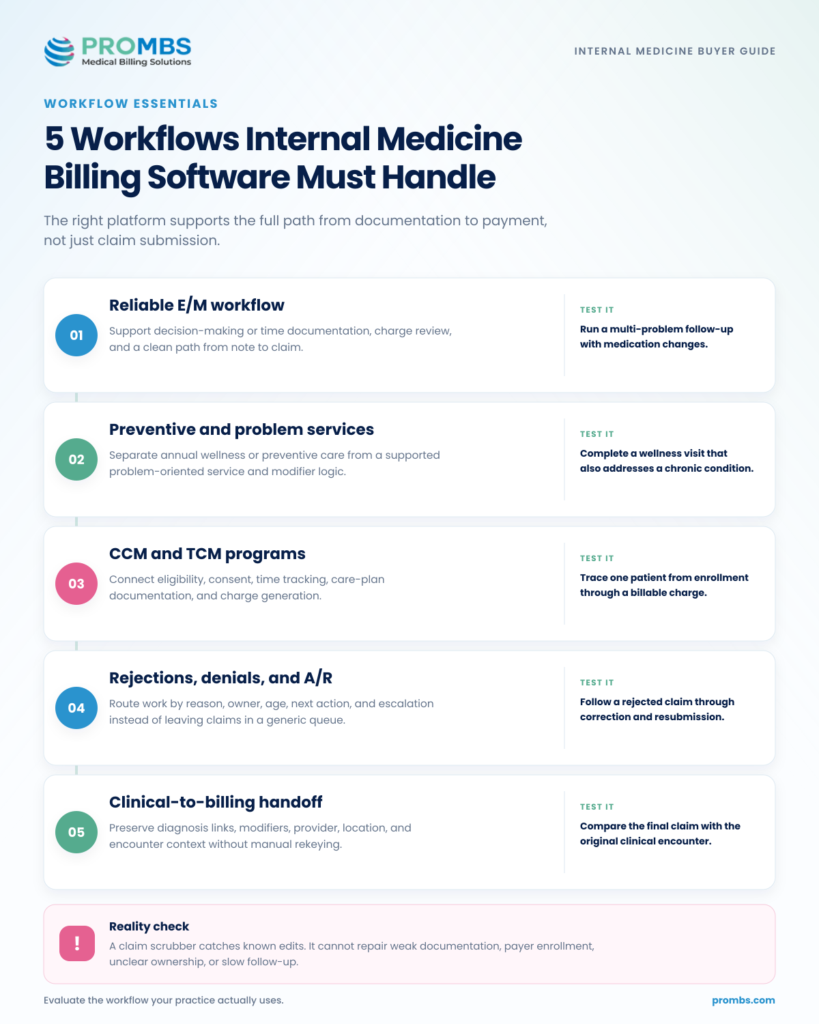
Reliable E/M workflow.
The system should make decision-making or time documentation easy to find and support clean charge review. CMS’s E/M services guide is a useful baseline for the underlying rules.
Preventive and problem services.
Test annual wellness and preventive visits that also address a significant problem, including documentation and modifier routing.
Care-management programs.
CCM and TCM need more than a code list. Look for eligibility, consent, time tracking, care-plan documentation, charge generation, and payer-specific exceptions.
Actionable claims management.
Rejections, edits, denials, and unpaid claims should route to named owners with age, reason, next action, and escalation visibility.
Clean clinical-to-billing handoff.
Good EHR billing integration preserves diagnosis links, modifiers, ordering providers, place of service, and documentation context without rekeying.
A common challenge we see is blaming the platform for a process gap. A scrubber can catch known edits. It can’t create missing documentation, fix enrollment, or appeal a denial with no owner. PROMBS’s internal medicine documentation guide explains why the clinical record is still the foundation of a clean claim.
Not Sure Whether the Problem Is Software or Workflow?
A platform can flag errors, but it can’t repair weak charge capture, payer setup, or denial follow-up on its own. A focused billing audit shows where revenue is actually getting stuck before you commit to a replacement.
The 12 Best Internal Medicine Billing Software Platforms
The order reflects overall fit for the target query, not a promise that number one is right for every practice. Use the Best for label to build a shortlist, then use the Pro tip to pressure-test it.
1. athenaOne: Best Overall for Scalable Internal Medicine Practices
athenaOne is the strongest all-around fit when a practice values a unified workflow more than à la carte control.
Best for: Independent practices and growing groups that want EHR, practice management, billing, and patient engagement in one connected operating system.
Key strength: A network-informed revenue cycle with broad payer rules and fewer handoffs between clinical and billing teams.
Pricing approach: Custom quote, commonly structured around a percentage of collections. Confirm the included service scope.
Key features
- Integrated scheduling, charting, charge capture, claims, statements, and patient payments.
- Rules-driven claim edits and payer workflow support across a large network.
- Billing workqueues, A/R visibility, and practice-performance reporting.
| Pros | Cons |
| Reduces rekeying and ownership gaps across the front desk, clinical team, and billers.Collection-based pricing can align vendor fees with practice volume. | A percentage fee may cost more than a flat subscription as collections grow.Standardized workflows can feel restrictive if your billing operation is highly customized. |
| Pro tip: Ask the vendor to map who owns coding edits, claim corrections, appeals, and patient follow-up. The software is only half the answer. |
2. AdvancedMD: Best for Configurable Billing Workflows
AdvancedMD is a good fit when your billing team wants a cockpit, not a simplified dashboard.
Best for: Multi-provider or multi-location practices, and billing teams that need detailed control over claims, A/R, user roles, and reporting.
Key strength: Deep practice-management and central-billing controls that can be configured around a mature billing operation.
Pricing approach: Custom quote. Separate modules, implementation, clearinghouse activity, and add-ons can affect the total.
Key features
- Claims management, electronic remittance, eligibility, and clearinghouse connectivity.
- A/R control center, central billing office tools, and configurable reporting.
- Integrated EHR, scheduling, patient communications, and payments.
| Pros | Cons |
| Strong operational depth for sophisticated billing teams.Modular suite can support growth without forcing an immediate full replacement. | Configuration and training can be heavier than a small practice expects.A quote may expand as modules, interfaces, and services are added. |
| Pro tip: Demo one encounter from check-in to zero balance across two locations. If the vendor can’t show responsibility at every handoff, keep digging. |
3. Tebra: Best for Independent Private Practices
Tebra makes the most sense for an owner-led practice trying to simplify several vendor relationships at once.
Best for: Independent practices that want clinical, billing, payments, patient communication, and online reputation tools from one vendor.
Key strength: A practice-growth ecosystem that connects patient acquisition and experience with everyday clinical and financial work.
Pricing approach: Package-based or custom quote. Confirm which billing, payment, messaging, and marketing modules are included.
Key features
- EHR and charge capture for ambulatory practices.
- Practice management, billing, patient statements, and payments.
- Online scheduling, reminders, intake, and patient communications.
| Pros | Cons |
| Broad fit for the operational realities of independent practice.Patient-facing and back-office functions can share one data flow. | Practices that need billing only may pay for a broader ecosystem than they use.Package boundaries and implementation scope need careful review. |
| Pro tip: Separate must-have billing functions from nice-to-have marketing tools before pricing. It keeps the decision tied to measurable revenue-cycle outcomes. |
4. eClinicalWorks: Best for Multi-Provider Practices Wanting an Integrated Suite
eClinicalWorks can suit a busy internal medicine group that wants a wide clinical and administrative platform, especially when patient engagement and population-health tools also matter.
Best for: Established ambulatory groups that want EHR, practice management, patient engagement, analytics, and optional RCM support under one vendor.
Key strength: A broad ambulatory platform with both software and revenue-cycle service options.
Pricing approach: The vendor publishes starting software packages; RCM services require scope-based pricing. Verify interfaces and implementation fees.
Key features
- EHR, practice management, scheduling, billing, and patient portal capabilities.
- Claim edits, denial workflows, payment posting, and RCM service options.
- Patient messaging, telehealth, and self-service tools.
| Pros | Cons |
| A wide ambulatory feature set can reduce the number of vendors a group manages.Software-only and service-supported models give practices room to choose. | Feature density can create a longer learning curve.Interfaces, service responsibilities, and contract scope need to be documented precisely. |
| Pro tip: Use a same-day preventive and problem-oriented visit in the demo. Watch how documentation, modifier logic, charge review, and payer edits reach the biller. |
5. NextGen Healthcare: Best for Midsize and Enterprise Internal Medicine Groups
NextGen Healthcare is most compelling when an internal medicine organization has enough scale to benefit from stronger governance, reporting, and revenue-cycle specialization.
Best for: Larger independent groups that need specialty-aware EHR and practice management, clearinghouse connectivity, analytics, and optional managed RCM.
Key strength: Enterprise-grade revenue-cycle breadth with tools and services for complex provider organizations.
Pricing approach: Custom quote. NextGen Office and enterprise products serve different practice sizes, so keep product scope explicit.
Key features
- EHR and practice-management workflows for ambulatory specialties.
- Clearinghouse, EDI, claim edits, coding, billing operations, and A/R support.
- Revenue-cycle reporting and operational analytics.
| Pros | Cons |
| Designed for organizational scale and complex specialty operations.Combines technology, clearinghouse, and service capabilities. | Can be too heavy for a small or lightly staffed practice.Migration and governance require disciplined project management. |
| Pro tip: Clarify whether the proposal is for NextGen Office or the enterprise stack. Product-name ambiguity can derail both price and implementation expectations. |
6. DrChrono: Best for Mobile-First Internal Medicine Practices
DrChrono stands out when mobility is a real workflow requirement, not a demo novelty.
Best for: Clinicians who document and capture charges on iPad or iPhone and want an integrated mobile-to-billing workflow.
Key strength: Point-of-care clinical and charge-capture workflows built around Apple devices.
Pricing approach: Custom plan quote. Ask about implementation, data migration, claim volume, messages, and other usage-based items.
Key features
- Mobile EHR and customizable clinical workflows on Apple devices.
- Custom billing codes and profiles, eligibility checks, and claim management.
- ERA auto-posting, superbills, CMS-1500 support, and patient statements.
| Pros | Cons |
| Excellent fit for clinicians who work from mobile devices.Clinical documentation and charge capture can stay in one workflow. | An Apple-centered experience may not match every organization’s device strategy.Migration and usage-related charges can change the effective price. |
| Pro tip: Run the same visit twice: once on the clinician’s mobile device and once through the biller’s follow-up queue. Both sides need to be fast. |
7. RXNT: Best for Small Practices Seeking Transparent Starting Prices
RXNT deserves a place on a small-practice shortlist because the buying process begins with more pricing visibility than many enterprise platforms offer.
Best for: Budget-conscious small practices that want a modular cloud suite with visible entry pricing.
Key strength: A practical combination of billing, practice management, EHR, and e-prescribing at an accessible starting point.
Pricing approach: The vendor’s pricing page lists healthcare software starting at $118 per month. Confirm the package, provider count, billing volume, and current terms.
Key features
- Medical billing and practice-management workflows.
- EHR and e-prescribing options in an integrated suite.
- Scheduling, patient communications, statements, and payments.
| Pros | Cons |
| Visible starting price makes early budgeting easier.A modular suite can work well for a small practice with straightforward needs. | Complex groups may eventually need deeper central-billing or enterprise controls.The lowest advertised price may not reflect the full package or claim volume required. |
| Pro tip: Price the real configuration, not the headline plan. Include providers, users, claims, eligibility checks, clearinghouse activity, texting, and implementation. |
8. PracticeSuite: Best for Multi-Location and Central Billing Operations
PracticeSuite is attractive when the billing organization must see several providers, locations, or tax entities through one lens.
Best for: Multi-location practices, larger billing departments, and organizations that need centralized control across entities.
Key strength: Billing-first depth with multi-entity practice management and central oversight.
Pricing approach: Tiered and custom options. Verify claim allowances, clearinghouse fees, users, interfaces, and managed-service terms.
Key features
- Multi-entity practice management and central billing workflows.
- Charge entry, claims, remittance, patient balances, and A/R reporting.
- Scheduling, patient communication, portal, and payment functions.
| Pros | Cons |
| Strong fit for centralized billing across multiple locations or clients.Flexible product and service options can support different operating models. | The interface and setup may feel heavier than lightweight small-practice tools.Pricing comparisons become difficult if claim, user, and add-on assumptions differ. |
| Pro tip: Build a reporting matrix before the demo. Require the vendor to show net collections, denials, aging, and unapplied cash by provider, location, payer, and entity. |
9. CareCloud: Best for Comparing Software with Managed RCM
CareCloud gives a practice room to compare two operating models without immediately changing vendors: run billing internally on the platform, or add managed RCM support.
Best for: Practices that want a modern PM and EHR platform but may also outsource part or all of the revenue cycle.
Key strength: An analytics-led suite with software and managed-service paths.
Pricing approach: Custom by product and service scope. Ask for both fixed software cost and percentage-based service cost in one total-cost model.
Key features
- Practice management, EHR, scheduling, billing, and payments.
- Managed revenue-cycle and practice-optimization services.
- Financial dashboards and operational analytics.
| Pros | Cons |
| Supports software-led and service-supported billing models.Analytics can help leaders spot trends beyond individual claim queues. | Total cost and contract complexity rise as services are layered in.Implementation quality and support responsibilities should be validated with references. |
| Pro tip: Define every KPI before signing. “Clean claim,” “first-pass acceptance,” “denial,” and “days in A/R” must use the same formulas in the contract and reports. |
10. CureMD: Best for Integrated AI and Denial Prevention
CureMD combines internal-medicine clinical workflows with practice management and revenue-cycle capabilities.
Best for: Internal medicine practices that want specialty-aware EHR, practice management, billing, and AI-assisted workflows in one platform.
Key strength: A connected clinical and financial ecosystem with specialty workflows and growing AI support.
Pricing approach: Custom quote. Separate software, implementation, interfaces, AI functions, and RCM services in the proposal.
Key features
- Internal medicine templates, medication workflows, and care coordination.
- Scheduling, eligibility, practice management, billing, and reporting.
- RCM services, claim review, denial prevention, and follow-up support.
| Pros | Cons |
| Specialty-aware clinical and billing functions can reduce disconnected work.All-in-one options suit practices trying to consolidate vendors. | Custom pricing makes early comparisons harder.AI recommendations still require governance, audit trails, and human review. |
| Pro tip: Bring one de-identified denial through the demo. Ask what the AI recommends, what evidence it uses, who approves the action, and how the audit trail is stored. |
11. CollaborateMD: Best for Billing-First Teams
CollaborateMD is a focused choice for teams that live in billing queues all day.
Best for: Medical practices and billing companies that need claims, clearinghouse, payment posting, rejection handling, and reporting more than a full clinical suite.
Key strength: A billing-first workflow with a built-in clearinghouse and direct rejection-management tools.
Pricing approach: Public tiered plans. Confirm provider, user, claim, ERA, eligibility, and integration thresholds.
Key features
- Built-in clearinghouse, claim scrubbing, and rejection workflows.
- ERA auto-posting, payment posting, patient billing, and reports.
- EHR encounter-data import and integration options.
| Pros | Cons |
| Billing-first design can reduce clicks for claim and payment teams.Public tiering improves early cost comparison. | Practices seeking one native clinical and billing platform may need more integration work.The quality of the EHR data import determines how clean the downstream billing workflow feels. |
| Pro tip: Import a real, de-identified encounter file during the evaluation. Measure missing fields, manual corrections, and the time from import to an accepted claim. |
12. OmniMD: Best for Internal Medicine-Specific Workflows
OmniMD earns its place because it speaks directly to internal medicine rather than asking the buyer to translate a generic workflow.
Best for: Practices that want specialty templates and billing support for annual wellness, chronic care, transitions of care, and quality programs.
Key strength: Explicit internal medicine workflows that connect clinical documentation with specialty revenue opportunities.
Pricing approach: Custom quote. Confirm what is native, what is configured during implementation, and what requires a separate service.
Key features
- Internal medicine documentation templates and order workflows.
- Annual wellness, CCM, TCM, and MIPS support.
- Integrated EHR, billing, practice management, and patient engagement.
| Pros | Cons |
| Clear alignment with common internal medicine care and billing workflows.Clinical, quality, and revenue functions can share the same platform. | Public pricing is limited.Specialty breadth may still require configuration, training, and payer-specific rules. |
| Pro tip: Test time tracking, consent, eligibility, documentation, charge generation, and payer exceptions for CCM and TCM. A marketing checkbox isn’t a workflow. |
How to Choose the Right Platform
Start with your workflow, not a vendor’s feature menu. The costliest surprises usually involve conversion, interfaces, unclear ownership, and unusable reports.
- Map the current revenue cycle. Document registration, eligibility, charge review, claims, ERAs, denials, patient balances, and A/R escalation.
- Define your operating model. Choose software only, co-managed billing, or full-service RCM before comparing prices.
- Build a true-cost model. Include fees, transactions, interfaces, migration, training, and internal staff time.
- Run scripted demos. Give every vendor the same scenarios and score clicks, queues, reports, and exceptions.
- Verify data rights. Cover ownership, usable exports, timing, fees, retention, and support after termination.
- Check security and access controls. Review the BAA, encryption, MFA, access, audit logs, backups, incidents, and subcontractors. HHS risk-analysis guidance reinforces that risk evaluation should be specific to how your organization handles electronic protected health information.
- Call references that resemble your practice. Match specialty, size, payer mix, billing model, and migration source.
A Demo Script Vendors Can’t Easily Dodge
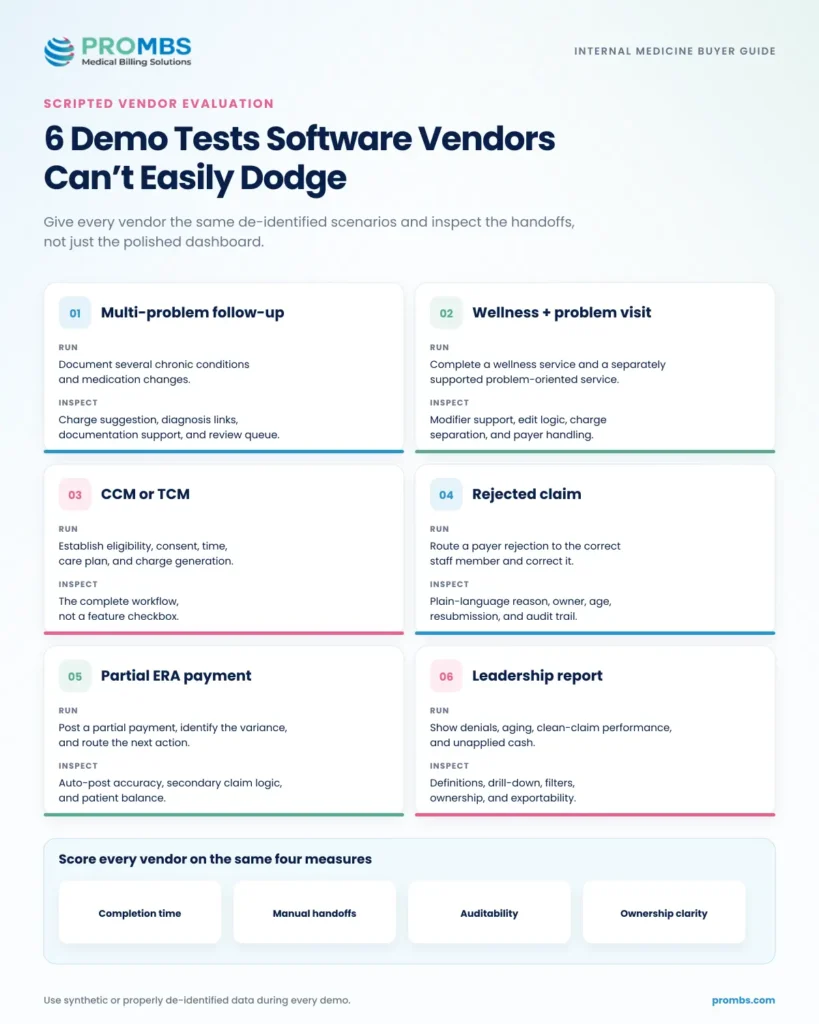
Use de-identified or synthetic data. Give each vendor the same six tasks, then score completion time, manual handoffs, auditability, and clarity of ownership.
| Scenario | Task | What to inspect |
| Multi-problem follow-up | Document a visit with several chronic conditions and medication changes. | Charge suggestion, diagnosis links, documentation support, review queue |
| Wellness plus problem visit | Complete a wellness service and a separately supported problem-oriented service. | Modifier support, edit logic, charge separation, payer handling |
| CCM or TCM | Establish eligibility, consent, time, care plan, and charge generation. | End-to-end workflow, not a feature checkbox |
| Rejected claim | Route a payer rejection to the correct staff member and correct it. | Plain-language reason, owner, age, resubmission, audit trail |
| Partial ERA payment | Post a partial payment, identify the variance, and route the next action. | Auto-post accuracy, secondary claim logic, patient balance |
| Leadership report | Show denials, aging, clean-claim performance, and unapplied cash. | Definitions, drill-down, filters, exportability |
Common Buying Mistakes
- Choosing from the EHR demo alone. The clinician’s note is only the first step. Make the vendor show the biller’s work all the way through payment and denial follow-up.
- Assuming a claim scrubber prevents every denial. Scrubbers catch known edits. They don’t fix coverage, medical necessity, authorization, documentation, payer enrollment, or appeal ownership.
- Comparing sticker price instead of total cost. A cheaper platform can become expensive after interfaces, transactions, training, and manual work are counted.
- Ignoring the exit before signing the entry. Data export, notice periods, auto-renewal, termination fees, and transition support belong in the first negotiation.
Leaving denial management ownership vague. Software doesn’t work a queue by itself. Assign owners, service levels, escalation paths, and reporting. PROMBS’s denial-management playbook provides a practical framework.
When Software Isn’t Enough
Sometimes the constraint is staffing, training, or accountability. If claims sit untouched or appeals lack documentation, new software may simply make the same backlog look prettier.
Smaller groups comparing medical billing software for small practices can use PROMBS’s small-business billing software guide to narrow the technology question. If follow-up, coding review, or staffing is the gap, internal medicine billing services may solve more than a platform change.
Before replacing anything, run a medical billing audit and review your accounts receivable process. Reasonable rejection rates with poor aging usually point to follow-up capacity.
Make the Software You Already Have Work Harder
Pro Medical Billing Solutions can work within many leading EHR and PM platforms, review internal medicine claims, uncover denial and A/R gaps, and help determine whether the next move is process improvement, staffing support, or a platform change.
Frequently Asked Questions
What is the best internal medicine billing software?
athenaOne is a strong overall choice, AdvancedMD Medical Billing offers deeper billing control, Tebra fits many independent practices, CollaborateMD is billing-first, and OmniMD offers specialty workflows. The right answer depends on size, payer mix, staffing, and billing model.
How much does internal medicine billing software cost?
Pricing may be a subscription, per-provider package, custom fee, or percentage of collections. Include implementation, migration, interfaces, transactions, training, and staff time. Ask for a three-year total-cost estimate.
Do I need separate EHR and billing software?
Not always. Integrated systems reduce duplicate entry. A separate billing platform can work when the EHR is clinically strong and the interface carries every required field. Test real encounters before deciding.
Can billing software prevent denials?
It can catch required fields, payer edits, eligibility, coding conflicts, and authorization data. Documentation, medical necessity, enrollment, coverage changes, and payer behavior still matter. Prevention needs software, trained staff, and follow-up.
Choose for the Workflow You Actually Have
Choose the platform your clinicians can document in, your billers can work efficiently, your leaders can audit, and your practice can leave without losing its data.
Shortlist two or three platforms, run the same demo, compare true cost, check references, and negotiate data and service responsibilities. If you’re unsure whether technology or workflow is the bottleneck, talk with Pro Medical Billing Solutions before committing to a replacement.